Trim, preview and stitch local videos for free. Add multicamera layouts, captions, tracking, maps and a complete audio toolkit with one permanent Premium purchase.
Premium Real 3.7.1 workspace · select any screenshot for the full-size view
Choose the tools you need
The essentials stay free. Premium grows with the edit.
Free
A complete trimmer and joiner
Make precise selections, build and revise a queue, keep or remove sound, and save individual clips or one finished video. Source-resolution exports, smaller-file options, recovery, hardware information and the complete Help guide are included.
No expiry date. No subscription.Premium · one purchase
A full composition workspace
Synchronise cameras, arrange views, add captions and graphics, track crops and blurs, work with maps, speed, zooms, transitions and layered audio, then save the edit as a reusable project.
One Microsoft Store purchase. Restore it with the same account.
Premium includes everything in Free. Existing Premium owners receive these additional tools with their current purchase. Prices can vary by market; Microsoft Store displays the price applicable to your account.
Included at no cost
Every free feature.
Open a group for the full detail. Trim, Stitch and Advanced are separate workspaces; switching between them keeps your current edits.
Free
Open, trim and preview precisely
+
Open or drag in local videos, including MP4, MOV, MKV, AVI, MTS, M2TS and WebM where their codecs are supported.
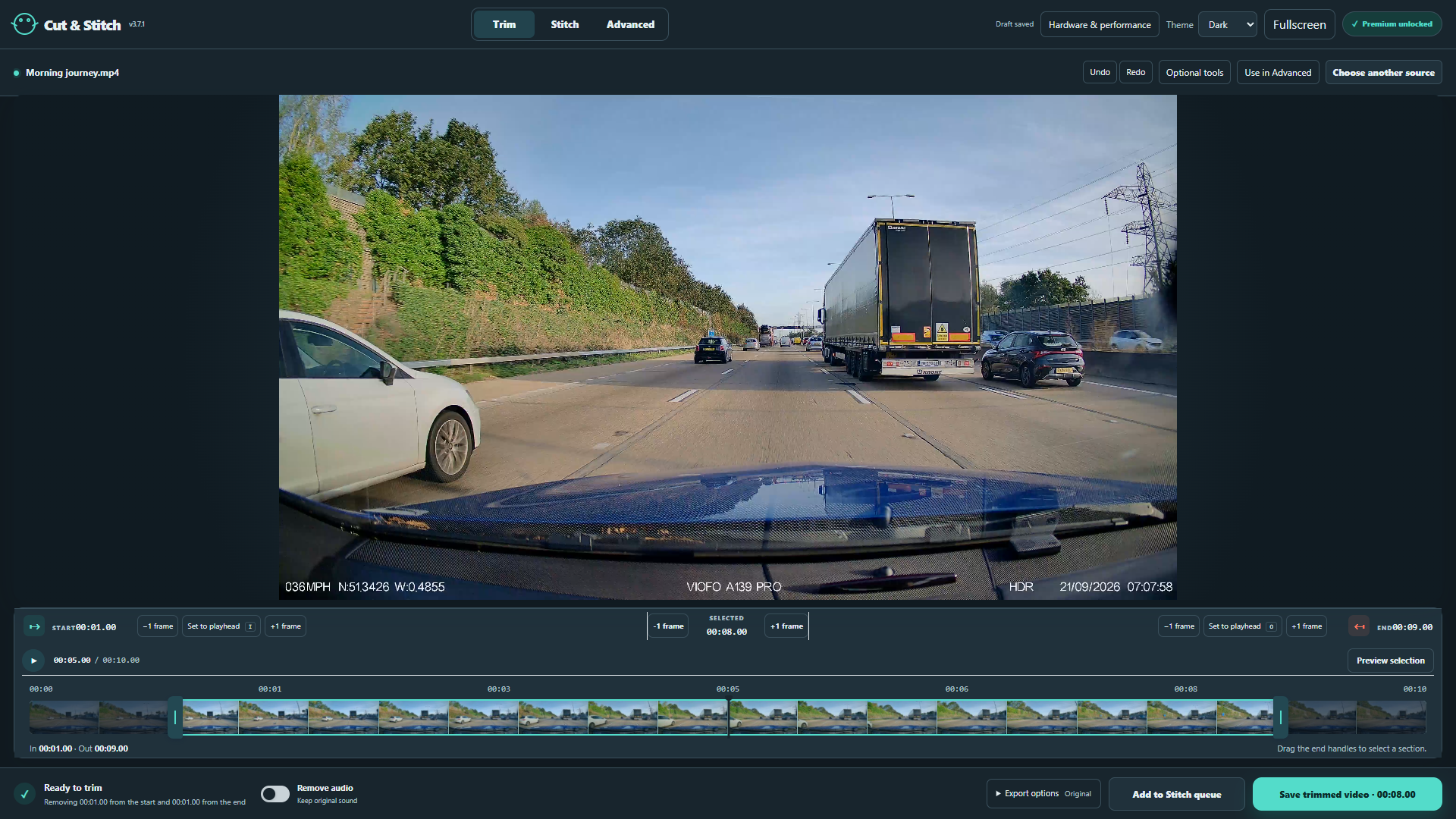
Play, scrub the filmstrip, preview a selection and set start/end markers with handles, exact time fields and frame stepping. Keep several selections from one recording and remove original audio.
Free
Build, revise and preview a Stitch queue
+
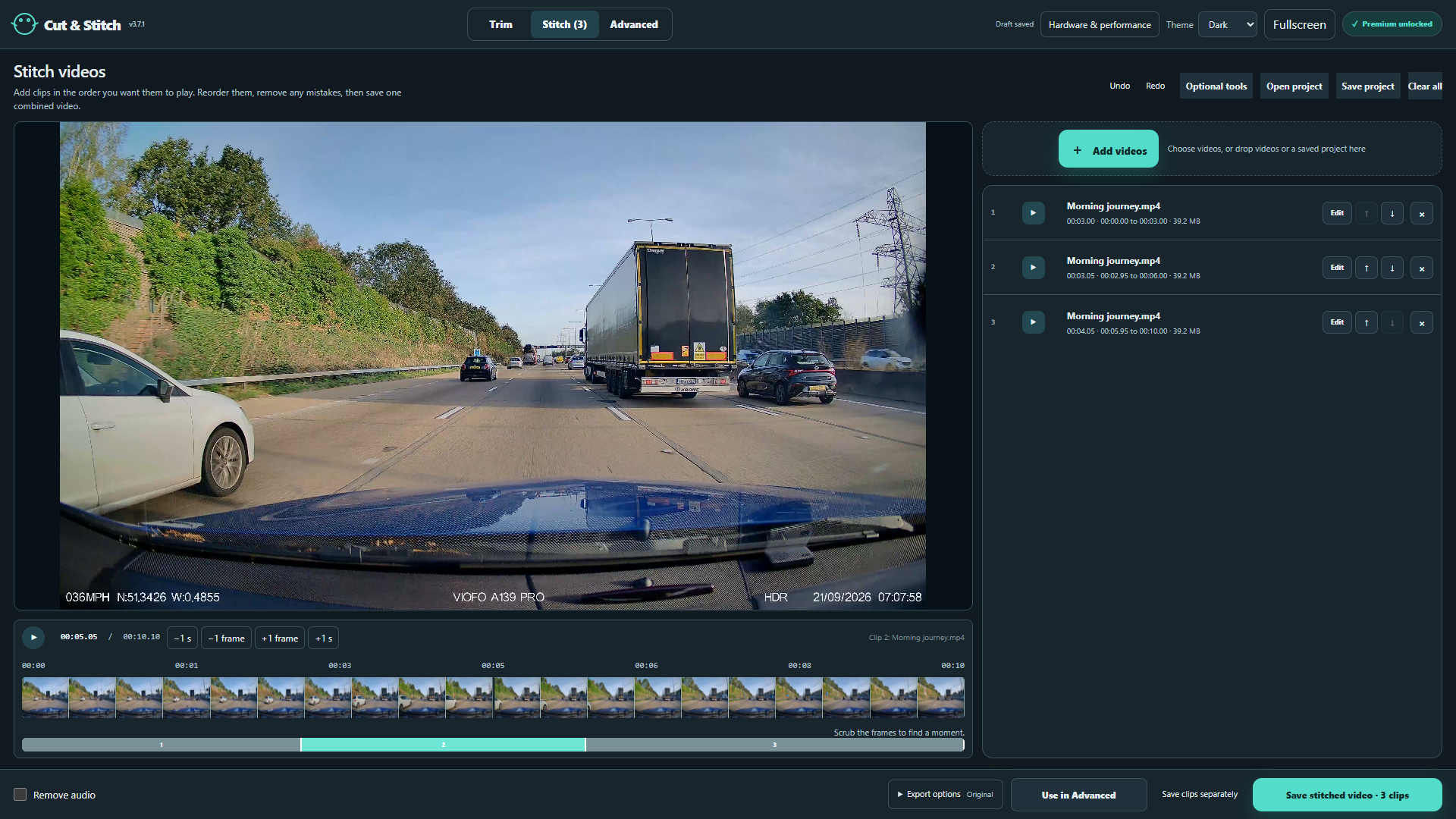
Stitch whole recordings and selected ranges in any order. Add, remove, reorder, preview, re-edit or replace clips, clear the queue, and step through joins by frame. Plain instant cuts are Free.
Free
Choose quality, file size and separate clips
+
Export at source resolution, including 4K sources, without a Premium resolution cap. Original quality copies compatible video without another encode where possible. Mixed formats, dimensions or frame rates can be converted into one sequence.
Choose Smaller file for H.264/AAC MP4, automatic size reduction or an approximate per-file target. See estimated and actual saved size, duration and dimensions. Choose Balanced or Faster encoding.
Save queued selections as separate clips with unique filenames. Repeat ranges; preserve existing files and completed clips if a later clip fails or you cancel.
In fullscreen Trim and Stitch controls, Export options opens inside the scrolling controls window. Scroll within that window to reach quality, file size, encoding speed and metadata settings while the timeline stays visible.
Free
Control metadata and recover your work
+
Choose Keep metadata or Clear metadata. Supported GPS and camera information can be retained with corrected timing in MP4/MOV; Clear metadata removes embedded source information, including supported hidden telemetry.
Undo and redo Trim/Stitch edits, and resume the last autosaved session. Recovery can retain your current workspaces together; source files must remain available.
Free
Choose your workspace and display controls
+
Choose Light, Dark or System appearance. Use fullscreen video, floating controls or up to eight separate controls windows with display selection and movable tool groups. Keyboard shortcuts, frame controls and numeric fields support precise editing.
Free
Inspect hardware and manage export performance
+
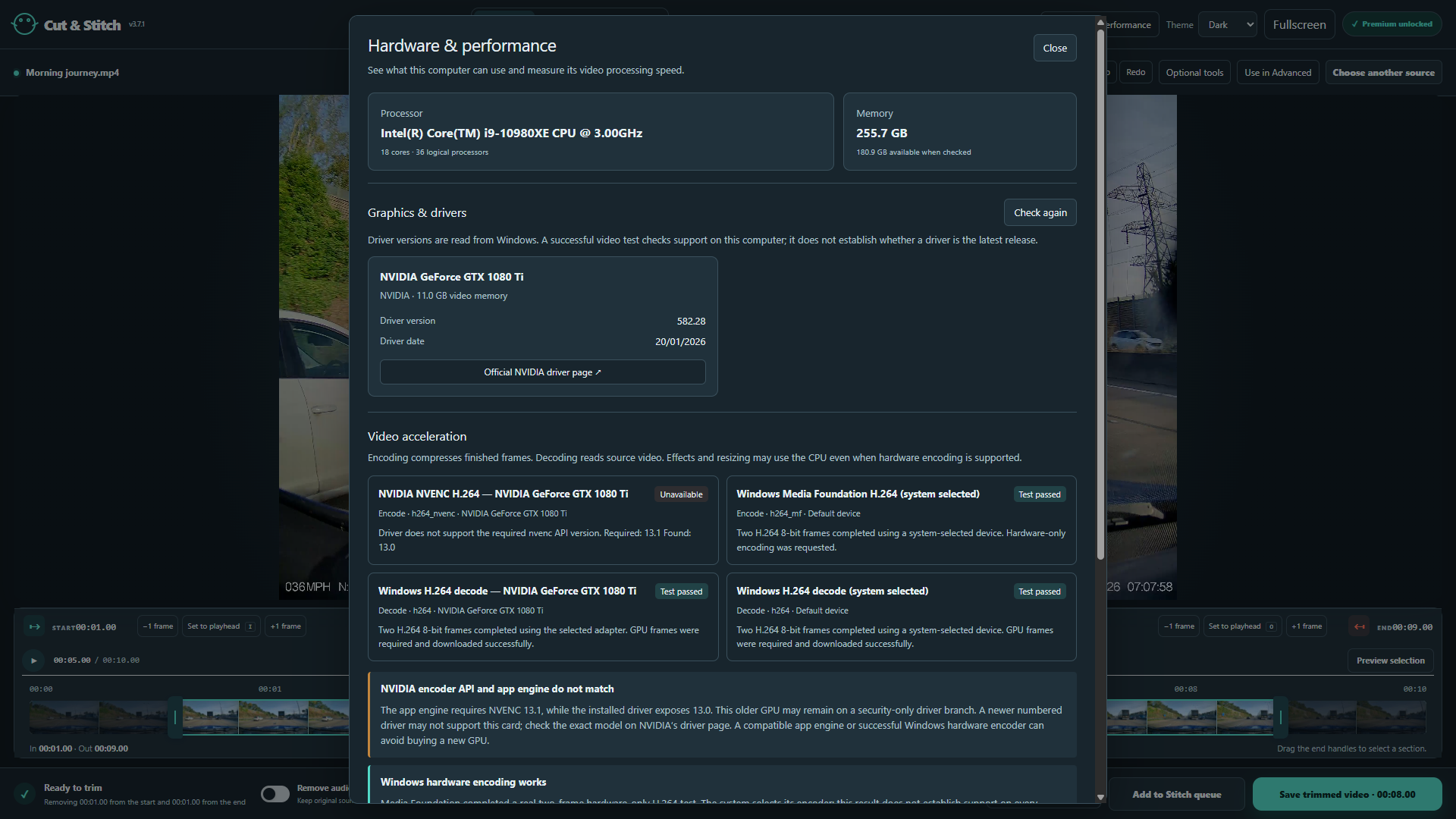
Inspect CPU, memory, graphics adapters, drivers and tested video acceleration in Hardware & performance. Run cancellable 1080p/4K benchmarks for decoding, frame preparation, encoding and combined processing, and open official driver support links.
Use compatible GPU processing with fallback. Stitch offers Automatic, Parallel where supported, or Single process; suitable work can encode two clips together. Processing shows stages, progress, elapsed time, estimated completion and available system CPU/RAM/GPU encoder/decoder readings. Cancel cleans unfinished output.
Free
Read the complete illustrated Help guide
+
Offline Help (F1): 36 chapters, 196 sections, search, quick starts, checklists, screenshot zoom, keyboard navigation and chapter/full-manual printing. All 32 captioned earlier tutorials are Free and labelled with their recorded version.
Optional permanent upgrade
Every Premium feature.
These tools require the permanent Cut & Stitch Premium add-on. Buy it inside the app; no subscription or automatic renewal is involved.
Premium
Multicamera editing, layouts and projects
+
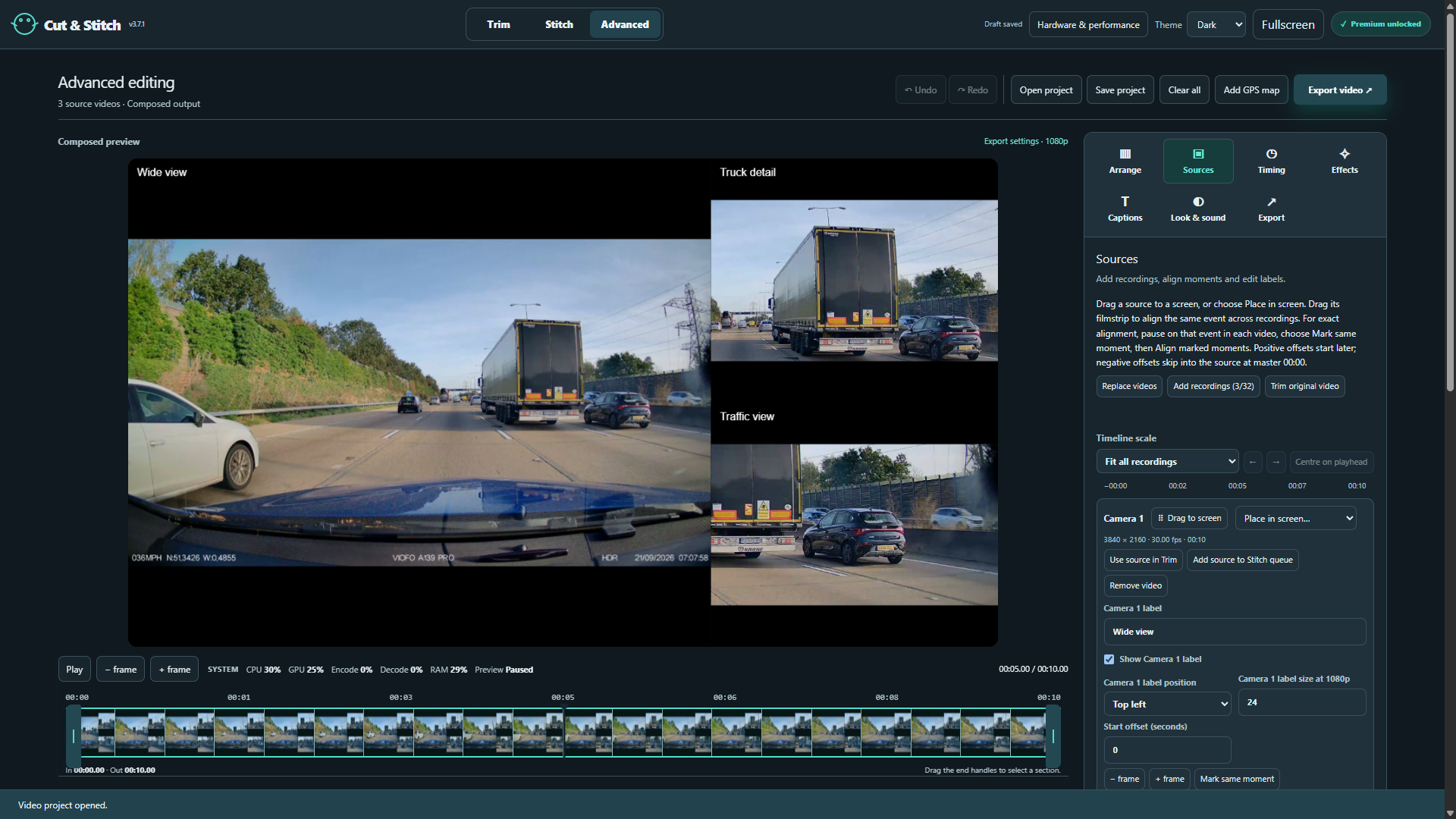
Work with one to 32 source recordings, up to ten main screen groups and 40 total views. Reuse a source in different views with independent crops. Add recordings, assign them to screens, replace or remove them without deleting original files, and undo edits.
Synchronize a shared event using marked moments, source offsets, draggable filmstrips or individual frame adjustments. Name cameras and add optional on-video labels with individual positions and sizes.
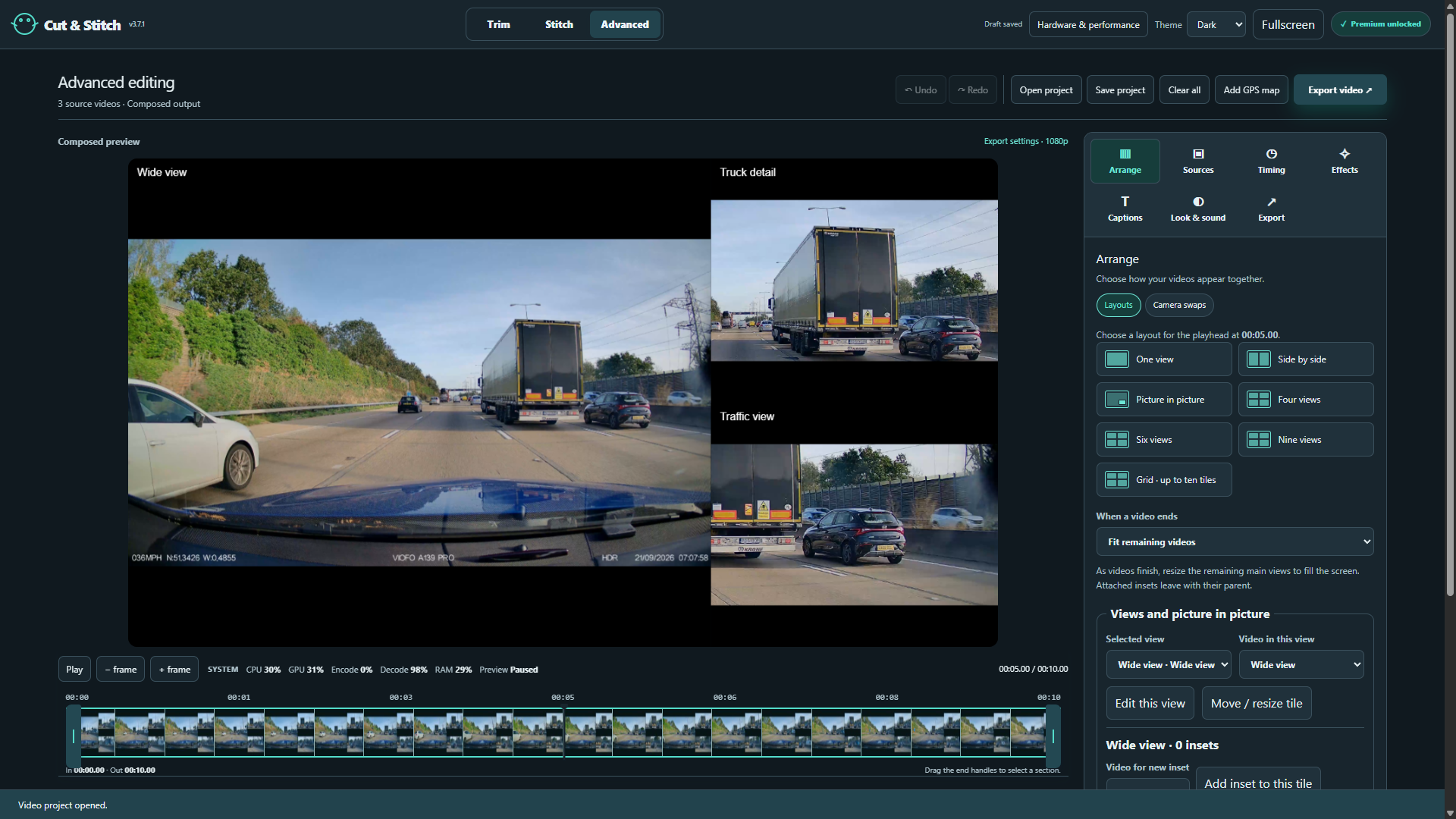
Choose one view, side by side, picture in picture, one-left/two-right, four/six/nine/ten-view grids, custom layouts, camera switching or sequential replay. Add timed layout changes, screen visibility, source replacement, swaps and rotations. Drag to move or exchange views; set exact position, size and timing.
Add multiple insets inside a tile. Move, resize or duplicate a tile together with its insets. Fit shows the whole picture; Fill crops to the screen. When a source ends, leave an empty tile, hold its final edited frame, or fit the remaining videos.
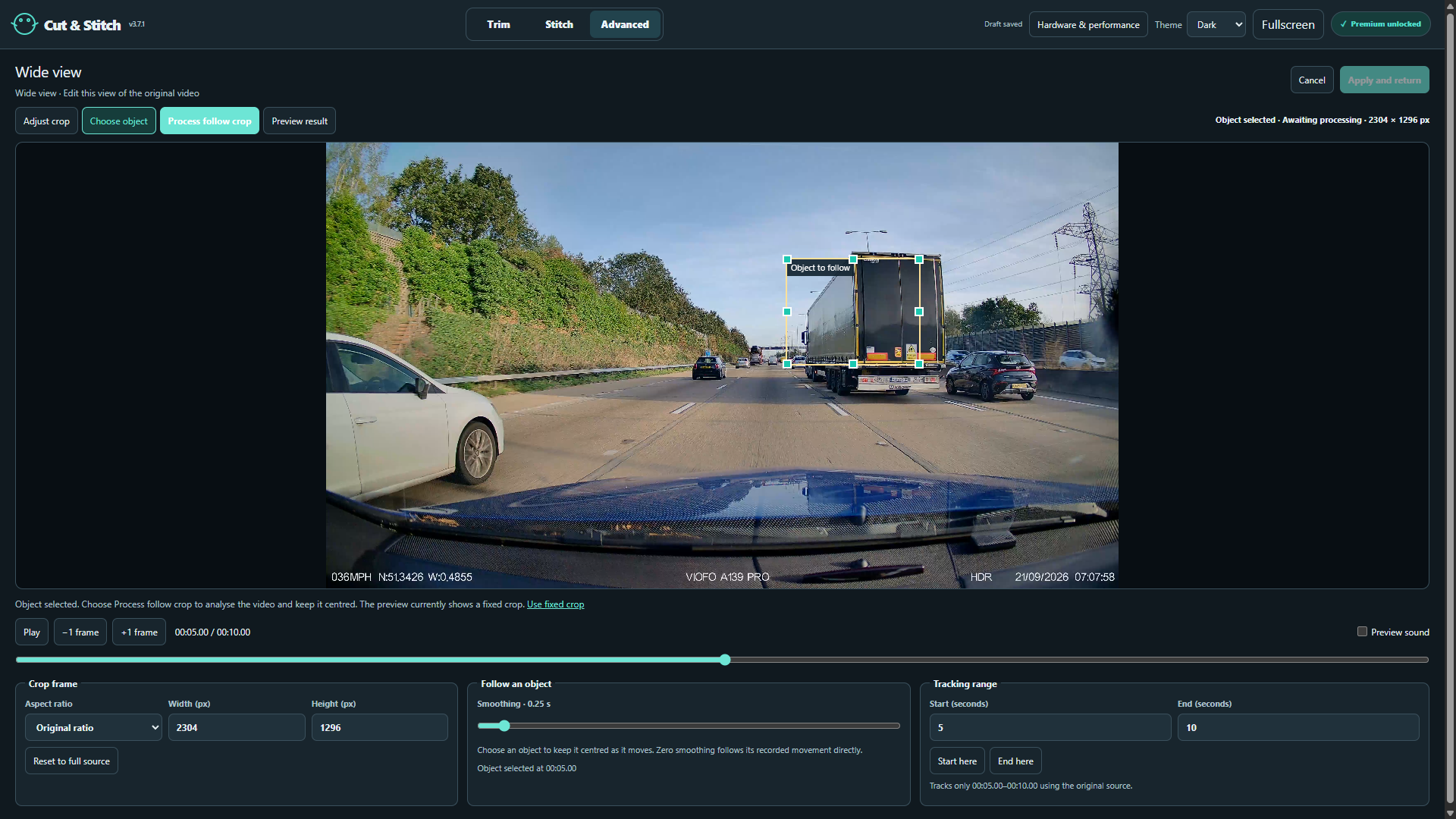
Edit a view's fixed crop using original, landscape, portrait, square or free proportions. Select an object and process a local following crop with adjustable smoothing and range. Each view keeps its own framing.
Choose one camera's sound, follow the visible camera, or mute. Make timed audio changes independently of layout changes.
Export landscape 1080p or 4K H.264/AAC compositions, including a dedicated two-camera side-by-side export. Render a selected composition into Stitch, or render a complete Stitch sequence into Advanced. Transfers create reusable clips.
Save and reopen editable .cutstitch projects for Advanced or Stitch, with editing decisions, media references and output settings. Advanced includes grouped Undo/Redo and an undoable Clear all.
Premium
Speed, zooms, captured details, filters and blur
+
Create up to 20 speed sections at 1×, 2×, 4×, 8× or 16×, with acceleration/deceleration ramps. Views and timed events stay synchronized; exported audio is retimed with pitch preserved.
Animate a fixed source region into a magnified inset or full-frame zoom. Set entrance, hold and exit, Smooth or Linear motion, size, position and optional border.
Add up to 30 frozen detail captures over moving video. Choose the source frame independently of display time, position and size the overlay, and use instant, fade, shrink-and-fade or slide-and-fade removal. Preview the complete capture animation independently of the selected export range. Exported captures preserve their chosen enlargement, animated border and fade in both classic and timed layouts.
Apply Original, Black and white, Warm, Cool, Higher contrast or Brighten shadows treatments, with adjustable strength, to the composition, zoom detail or capture.
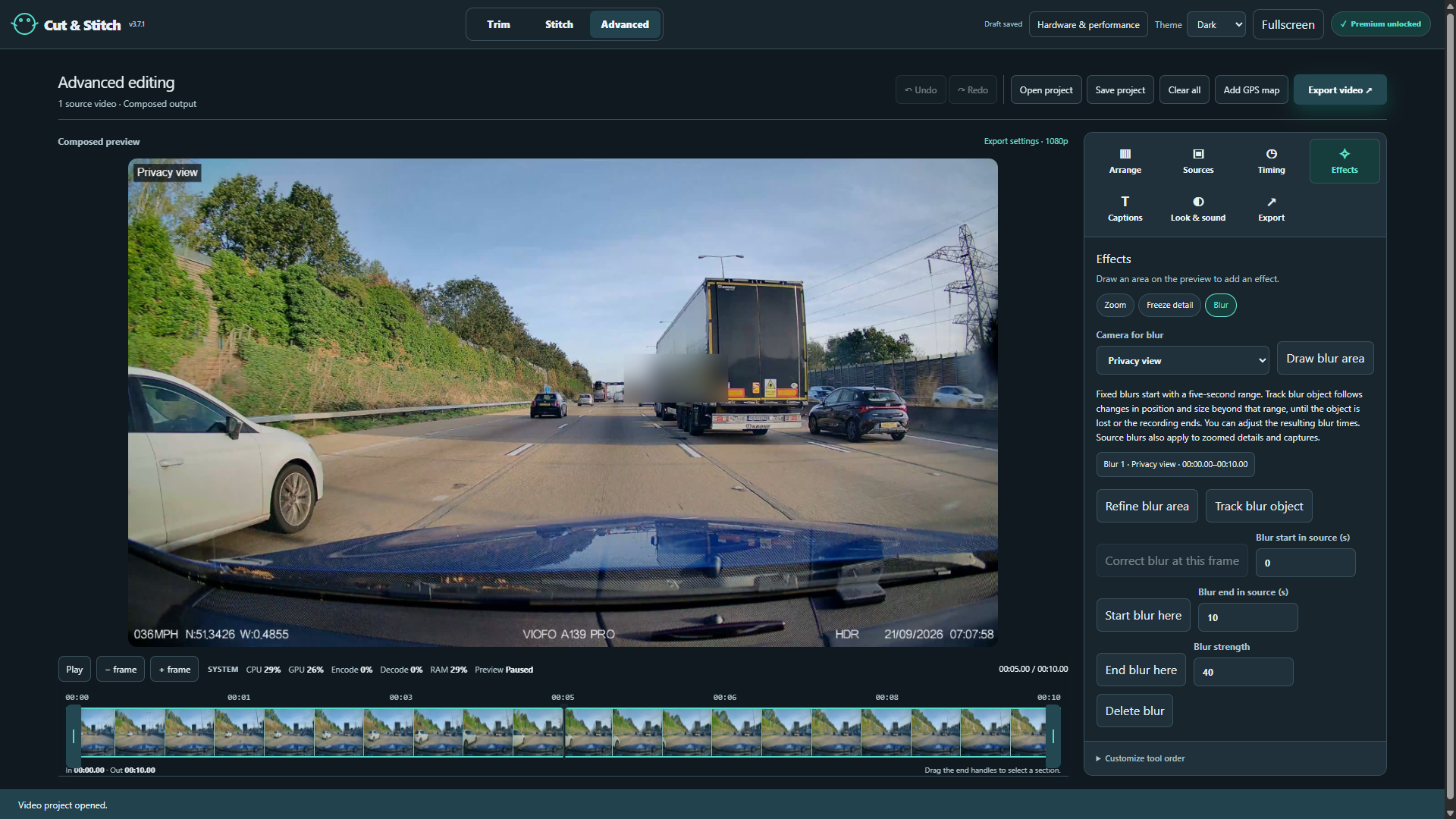
Add multiple fixed or tracked blur regions in Trim and Advanced. Set ranges and strength, track movement and size locally, correct drift at individual frames, or return to a fixed area. Blurs also apply inside zooms and captures.
Prepare local 4× AI detail for magnified insets and captures using bundled models. Choose Balanced, Smoother edges, Extra definition or Analyse neighbouring frames; compare with the original, cancel, retry or reprocess. Choose automatic GPU/CPU fallback, preferred Vulkan, preferred DirectML or CPU only.
Premium
Captions, drawings, animation and speech recognition
+
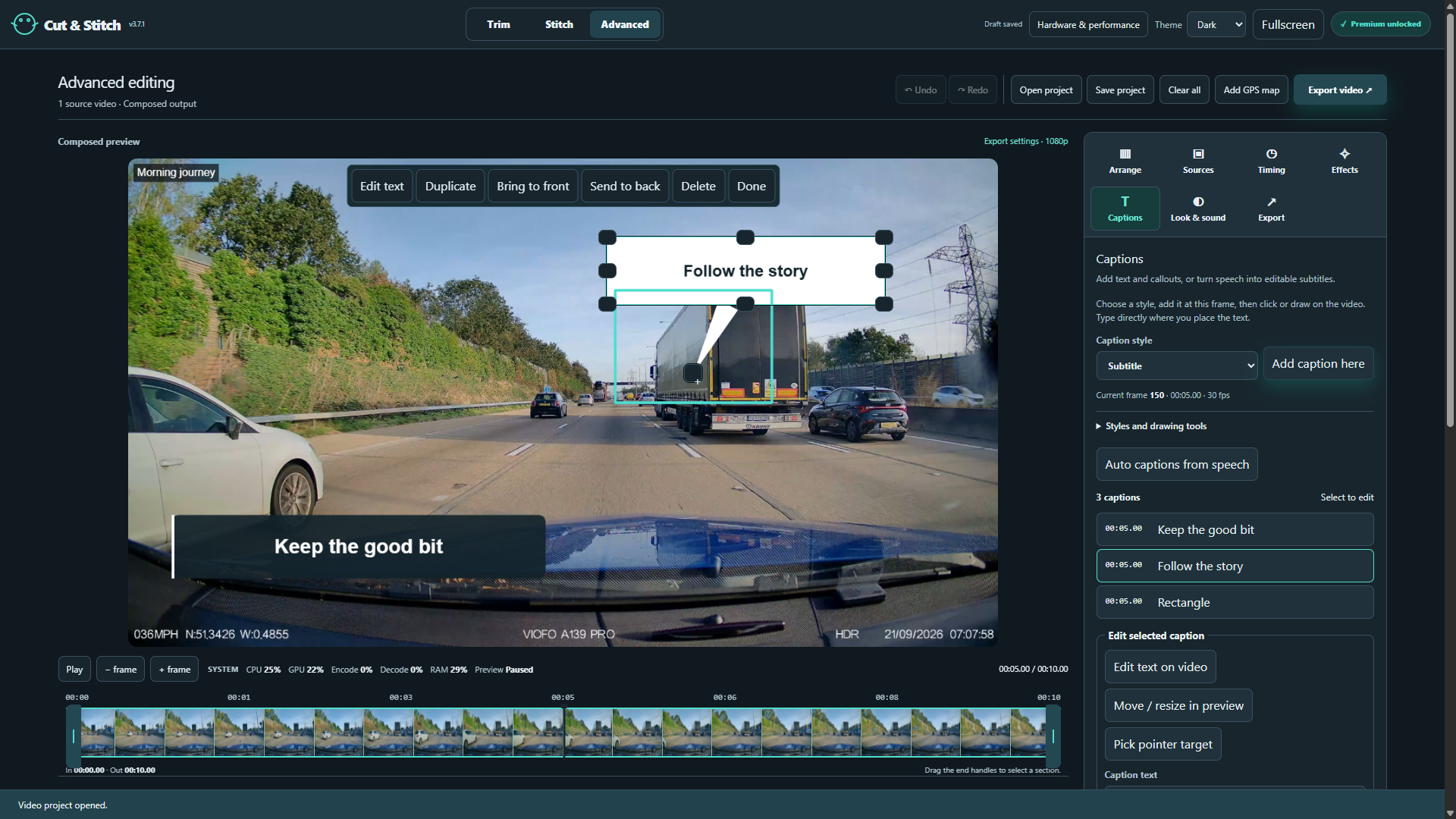
Type directly on the picture: subtitles, plain titles/text, lower thirds, labels, speech/thought bubbles and arrow callouts. Edit exact start/end times or frames, font, size, colour, alignment, opacity, rotation, placement and box size.
Draw rectangles, ellipses, lines, arrows, triangles, diamonds, stars, highlights, numbered markers, ticks, crosses and freehand strokes. Adjust fill/stroke, move or resize items, aim bubble/callout pointers, duplicate, and bring forward/send backward.
Animate entrances and exits independently with None, Fade, Slide, Spin, Pop/scale, Wipe, Draw on or Typewriter. Choose durations, directions and custom slide/spin endpoints.
Create speech captions locally and offline with bundled multilingual Whisper recognition. Select a recording and language or automatic detection, process the export section or full source, optionally replace matching subtitles, then review the words and timing.
Import or save SRT/VTT subtitle text and timing, including export-range and speed changes. Visual styles remain in the editable project and rendered video.
Premium
GPS maps and recorded speed
+
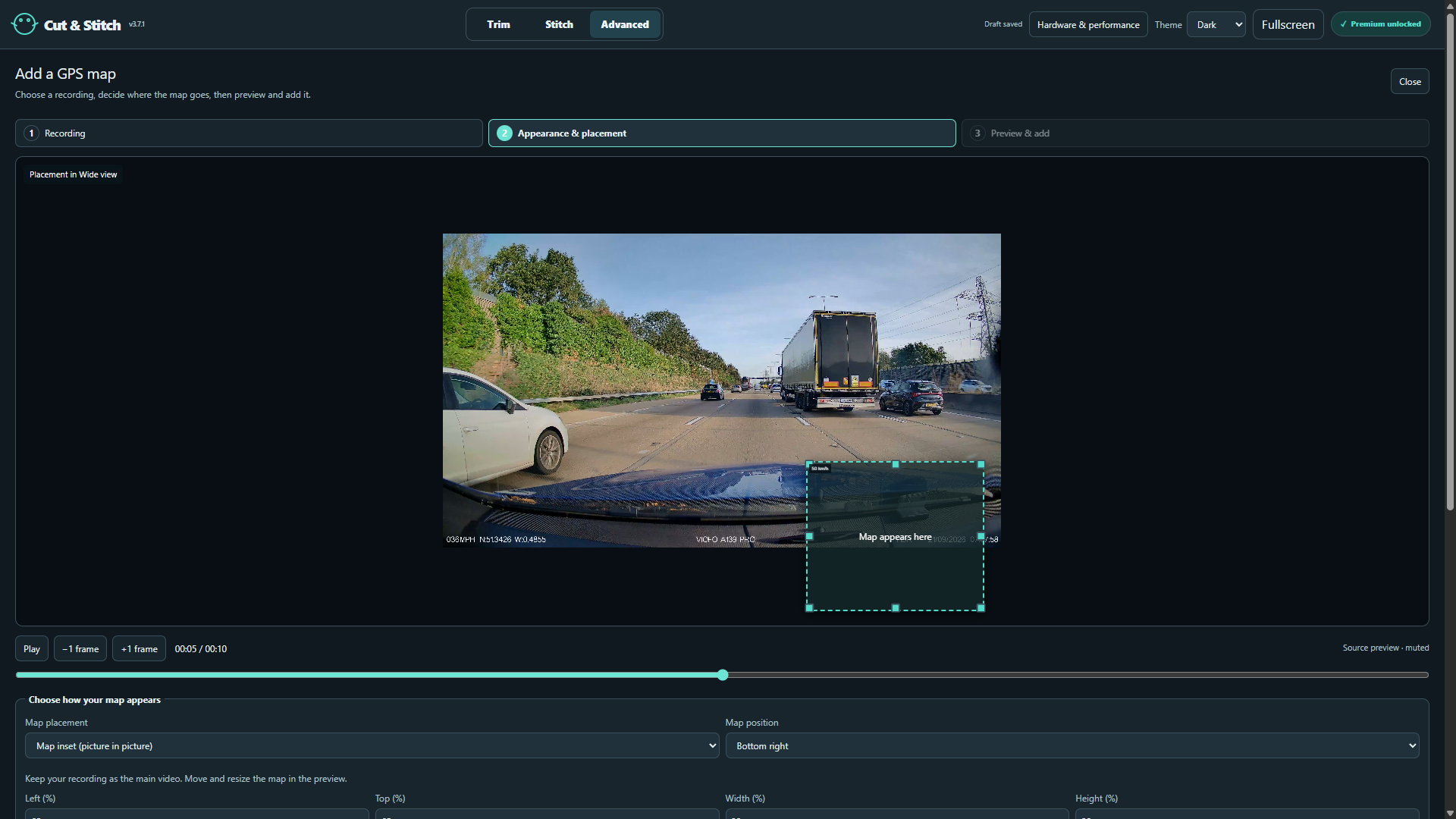
Read supported embedded, timed GPS from original camera footage and create synchronized map video. Choose a route, Street or Light styling, Follow vehicle or Whole journey, and zoom.
Place a map inset, make the map the main view with a recording inset, or add it as a source for your layout. Drag, resize or enter precise placement; refresh its rendering for a changed size.
Show recorded speed in MPH or KPH with adjustable size and position. Maps fade in at the first fix, disappear during GPS gaps and return with GPS. Retain readable map credits and copy publication credits.
Prepare lighter previews for supported older generated maps while retaining original export media. Keep separate named camera GPS tracks in supported composition exports.
Premium
Transitions, layered audio and narration
+
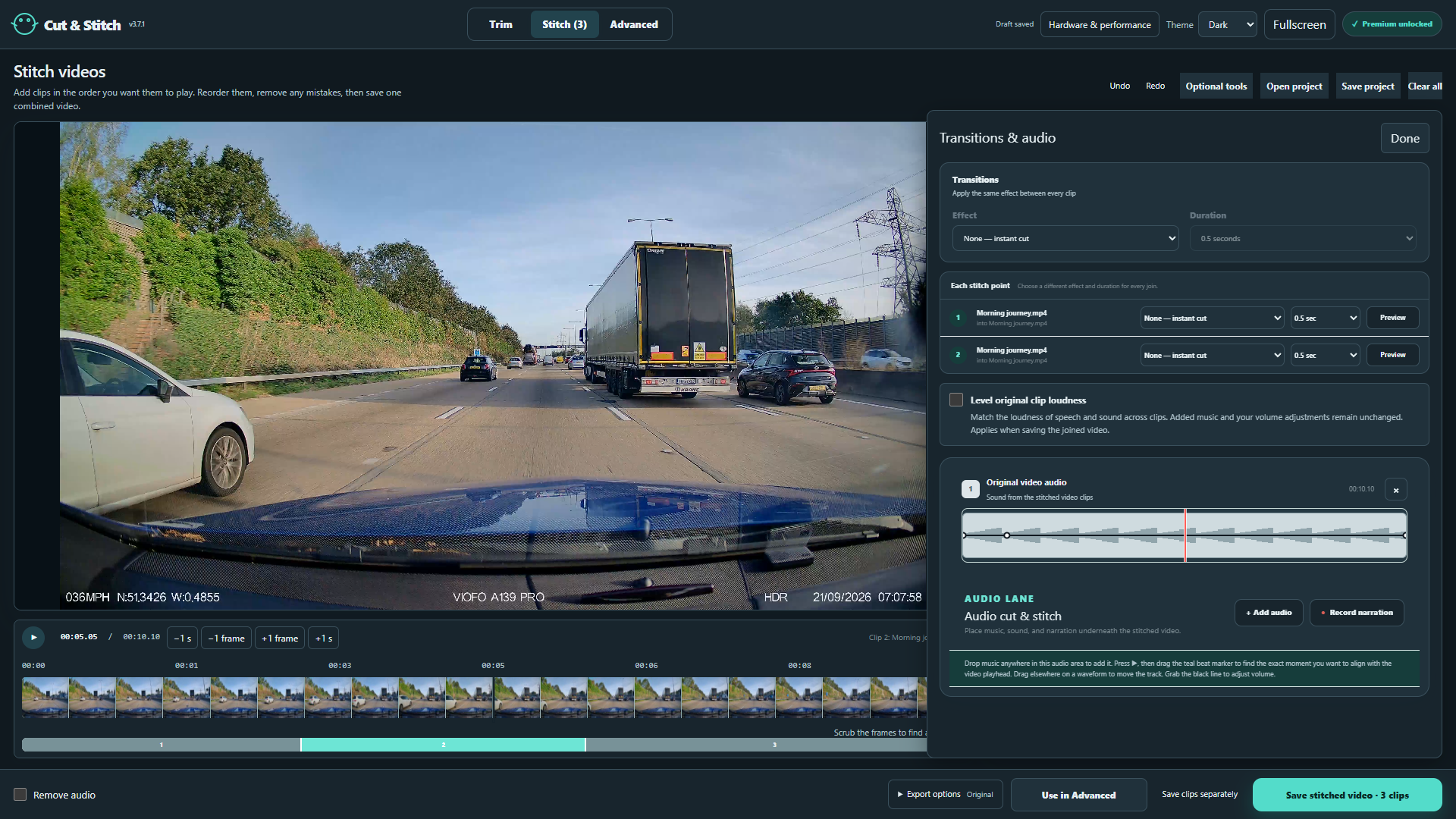
Apply one transition to every join or customize each join and duration: Classic fade, Dissolve, Fade through black/white, Blur fade, Pixelate, directional Wipe, Smooth wipe or Slide, Circle open/close, Radial sweep and Zoom in.
Layer music, sound effects and microphone narration in Stitch. View waveforms, audition audio, trim In/Out, align a beat, position overlapping tracks, reorder lanes and remove or restore original sound.
Draw volume envelopes from silence to 200% for original and added audio. Make fades and deliberate music dips beneath speech; hear your changes during preview.
Record narration while the sequence plays. Level original clip loudness across a combined export while preserving mute, added tracks and deliberate volume changes.
Inside the application
Real tools. Real screenshots.
The ten screenshots prepared for the 3.7.1 Microsoft Store listing, with the featured workflow marked Free or Premium. A free-workflow screenshot may also show optional Premium controls.
Free
Trim precisely
Choose the part to keep with timeline handles and frame stepping.
Free
Stitch your clips
Put clips in order and save one combined video.
Premium
Transitions and sound
Shape the joins, add music and adjust the sound.
Premium
Arrange your views
Arrange independent views and picture in picture in Advanced.
Premium
Synchronise recordings
Use source timelines and frame controls to align a shared moment.
Premium
Captions and drawing
Place text, speech bubbles and shapes directly on the picture.
Premium
Crop and follow
Frame one view and select an object for a following crop.
Premium
Add a GPS map
Choose a recording and place a map using its recorded GPS information.
Premium
Protect private details
Select and track areas to blur within the video.
Free
Hardware and performance
Inspect hardware support and understand encoding and decoding activity.
Practical answers
Before you start.
Is Free a trial, and does Premium renew?
+
Free has no expiry. Premium is a one-time permanent Microsoft Store add-on. Microsoft Store shows the current price for your region. It belongs to the Microsoft account used to buy it; restore or refresh ownership in the app with that account when necessary. Existing Premium owners do not need to buy again. There is no subscription or automatic renewal.
Which parts need an internet connection?
+
Editing, GPS extraction, tracking, AI detail, speech recognition and video encoding run locally; your recordings are not uploaded. Creating GPS maps requires internet access and acceptance of the map provider's terms. Map requests disclose your IP address and requested geographic areas to that provider. Finished map videos can be used offline. Microsoft Store also needs a connection for installation, updates, purchases and account checks.
What should I check before sharing an export?
+
Original-quality copying may cut at nearby keyframes. Effects, metadata removal and mixed media can require conversion. Smaller-file targets and completion times are estimates; re-encoding can reduce quality. Acceleration depends on hardware, drivers and footage.
AI can invent detail; captions and tracked regions need review. AI source crops are limited to 1024 × 1024 pixels. GPS support depends on the recording's format/firmware; separate FIT/GPX logs are not imported. Clear metadata does not erase information already visible in the picture. Projects and recovery reference original/generated media, so keep those files. Portrait/square crops do not change the landscape composition output.
Watch the finished file to check cuts, sound, captions and every tracked crop or blur. Volume dips beneath speech are manual; the app does not promise automatic speech ducking or noise removal.
Can I export 4K for free?
+
Free Trim and Stitch can retain the original source resolution, including 4K where supported. Premium adds the composed landscape 1080p/4K canvas with multiple views, effects and overlays. Hardware and codec support determine which jobs your PC can process efficiently.
Where can I find step-by-step instructions?
+
Open Help in the app for the complete offline manual, chapter search, guided checklists, expandable screenshots and printing. It covers all these workflows and labels the older tutorial material. Help remains free, including instructions about Premium tools.
Installation and updates through Microsoft Store
Start with the free editor.
Install Cut & Stitch for Windows x64, then choose Premium inside the app whenever you need the additional tools.
C&S
Cut & Stitch Video EditorFree base app · Premium one-time purchase